Multi-Branch POS Software
Multi-Branch POS Software for Controlled Retail Operations
Multi-branch POS software connects checkout activity at separate stores with controlled product, price, tax, customer, payment, inventory, transfer, and reporting records. T7 ERP supports retail chains that want each branch to keep its operational identity while authorised teams review consolidated information. A multi-store rollout must define what is central, what remains branch-specific, and what happens when connectivity fails. Buyers should test catalogue distribution, price and promotion changes, document numbering, stock transfers, offline transactions, synchronization conflicts, returns across branches, permissions, cash and digital-payment reconciliation, and period close. A central dashboard is useful only when branch masters, timing, exceptions, and reconciliation are governed consistently.
Product information updated 15 October 2026.
What is multi-branch POS software?
Multi-branch POS software is a retail system that records sales and related counter transactions by store while sharing selected masters and reporting across the organisation. It can centralise products, tax configuration, price lists, customer rules, permissions, and management views, yet preserve branch-specific stock, users, cash drawers, document series, and local exceptions. When offline operation is configured, branches may continue selected tasks locally and synchronise later. That creates additional controls: the business must understand data ownership, sequence numbers, master changes, duplicate or conflicting records, transfer status, delayed visibility, and failed synchronization. Successful multi-branch POS is therefore a governance project as well as a software rollout, with named owners for catalogue, pricing, transfers, users, reconciliation, and exception resolution.
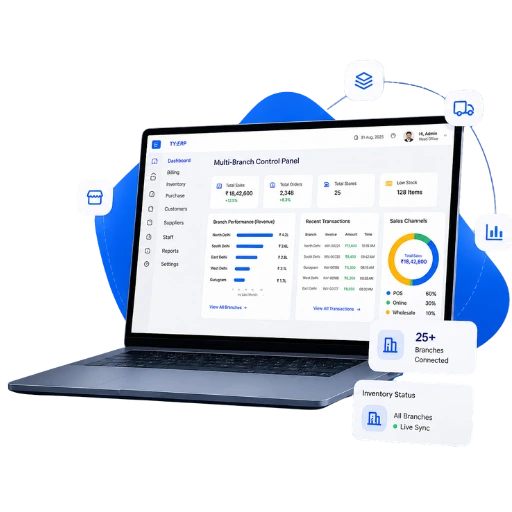
Separate store systems versus connected multi-branch POS
Central visibility is created by consistent transactions and synchronization, not by merging spreadsheets after close.
| Control area | Separate store tools | Connected multi-branch POS |
|---|---|---|
| Catalogue and pricing | Updated independently | Selected central masters distributed under defined controls |
| Stock | Each store reports balances separately | Branch movements and transfers retained in one operational model |
| Offline operation | Local files without controlled merge | Configured local workflow with later synchronization and exception handling |
| Management reporting | Manual consolidation | Authorised branch and consolidated views from posted transactions |
Operational Coverage
What This Workflow Needs to Cover
Branch-aware checkout
Retain store, counter, cashier, document, and payment context for each transaction.
- ✓ Branch users and permissions
- ✓ Store-specific numbering and shifts
- ✓ Sales, returns, exchanges, and receipts
Central master control
Distribute selected product and commercial rules without removing necessary local control.
- ✓ Products, taxes, and price lists
- ✓ Promotion or discount governance
- ✓ Effective-date and approval process
Inventory and transfers
Track stock by branch and preserve the hand-off between sending and receiving locations.
- ✓ Branch stock movements
- ✓ Transfer issue, transit, and receipt
- ✓ Variance, damage, and adjustment review
Synchronization and reporting
Define when central views update and how incomplete records are handled.
- ✓ Configured offline transaction synchronization
- ✓ Retry and conflict review
- ✓ Branch and consolidated operating reports
How to roll out multi-branch POS
Prove one store and one central process before scaling to every location.
- STEP 1
Define central and local controls
Assign ownership for catalogue, prices, taxes, users, stock, transfers, payments, reports, and exceptions.
- STEP 2
Standardise branch data
Clean products, locations, users, devices, balances, numbering, price lists, and opening stock.
- STEP 3
Pilot synchronization
Test sales, returns, transfers, master changes, offline periods, duplicate risks, delayed sync, and recovery.
- STEP 4
Reconcile before expansion
Match branch POS, cash, payments, stock, transfers, taxes, and consolidated reports for the pilot period.
Multi-branch POS evaluation checklist
Simulate two branches changing and transacting at the same time, including a network outage.
Master-data distribution
Confirm who can change products, prices, taxes, promotions, customers, and users and when branches receive those changes.
Offline and conflict behaviour
Test numbering, local data, master versions, duplicate records, retry, delayed visibility, and recovery after extended outages.
Transfers and cross-branch returns
Demonstrate issue, transit, receipt, variance, cancellation, return location, customer history, and accounting impact.
Consolidation and access
Verify branch cut-off, time zones, permissions, eliminations if relevant, payment reconciliation, and drill-down to source transactions.
When T7 multi-branch POS may fit
Good fit when
- ✓ Retailers operating multiple stores with shared products or controls
- ✓ Chains needing branch stock, transfer, cashier, and payment visibility
- ✓ Teams prepared to standardise masters and reconcile synchronization exceptions
Confirm before choosing
- • Offline duration, network reliability, local devices, numbering, and recovery
- • Central versus local pricing, promotion, user, return, and stock authority
- • Franchise, legal-entity, GSTIN, consolidation, and integration complexity
Questions
Frequently Asked Questions
Can each branch bill during an internet outage?
Selected offline workflows may be configured. Confirm supported actions, local data, numbering, master versions, synchronization, conflicts, and recovery for the exact deployment.
Can head office control prices?
Central price and promotion control can be configured, but the business must define effective dates, branch exceptions, approvals, offline behaviour, and audit history.
How are branch stock transfers tracked?
A controlled workflow should record dispatch from the sending branch, goods in transit, receipt at the destination, and any variance, damage, rejection, or cancellation.
Can customers return items at another branch?
Cross-branch returns depend on customer, invoice, tax, stock, payment, policy, and integration rules. Demonstrate the required scenario before rollout.
Does consolidated reporting update instantly?
Freshness depends on posting and synchronization status. Reports should show the relevant cut-off and let authorised users identify delayed or failed branch records.
Evaluate T7 ERP With Your Actual Workflow
Bring a sample invoice, product catalogue, branch structure, or process requirement to a scoped product walkthrough.
Request a Demo →